Breaking edges with brush displacement
Adjust the workbench image filter and compare its effect on outlines, shading, and small details.
Stylized rendering / Part 2 / Michael Rowe Jones
A painted edge rarely follows the exact outline of the thing it describes. Brush marks overlap it, leave gaps, or pull it in another direction. A 3D render usually gives us a much more regular boundary.
This filter uses a brush texture to disturb that boundary. The texture tells the shader where to read colors from the rendered image, making an outline uneven without changing the model. The challenge is to keep enough of the original shape for it to remain readable.
The experiment uses a still image of a desk. Start with Texture only, then switch to Displacement only and watch the lamp's outline.
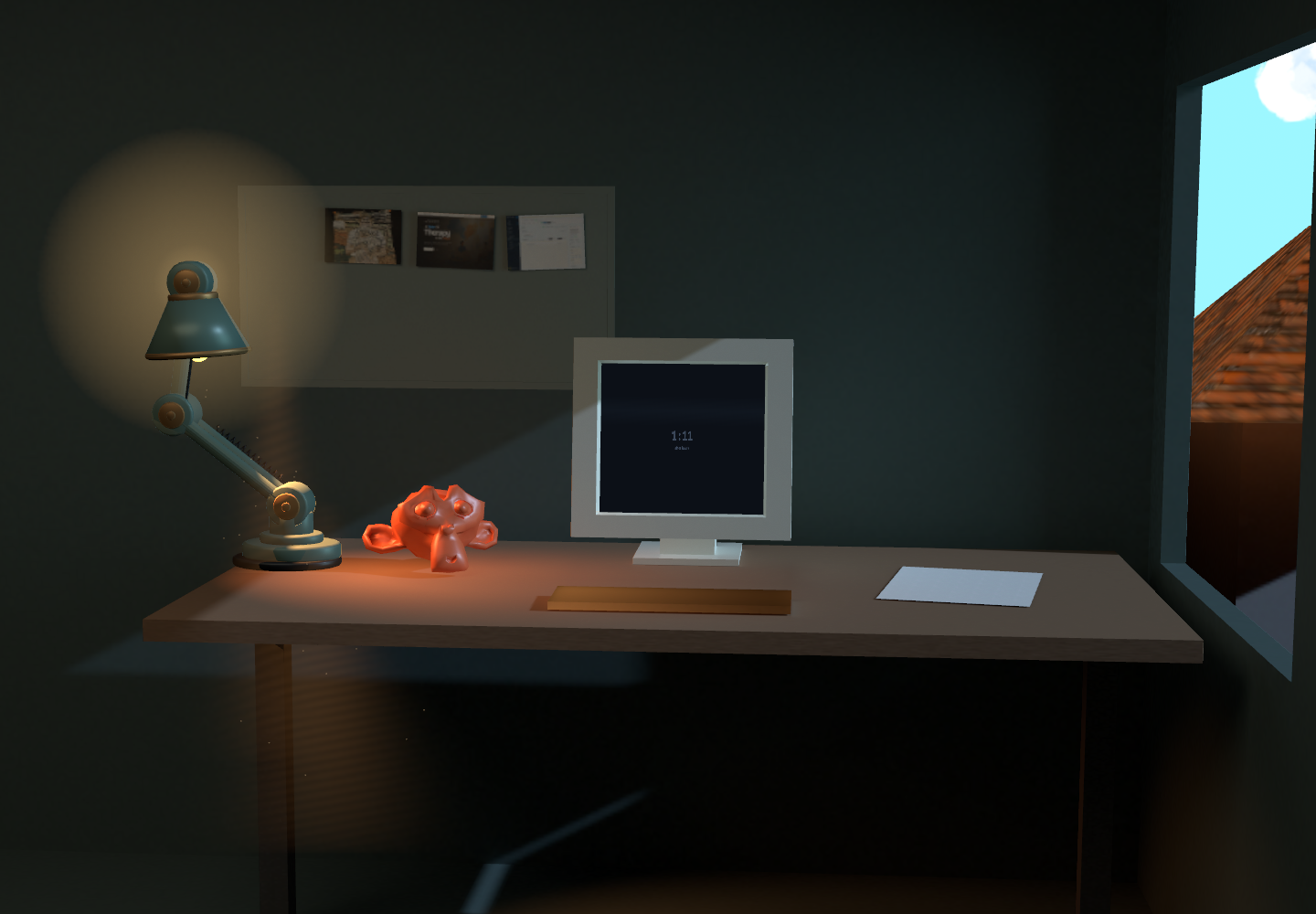
Load the experiment to change the effect on this image.
Moving the sample
An image shader calculates a color for each output position. Usually it reads the input image at the corresponding position. Displacement adds an offset before that read.
Consider the dark lamp against the pale background. A sample just outside the lamp returns a pale color. Move that sample inside the lamp and the output pixel becomes dark. When neighboring samples move by different amounts, the visible outline becomes uneven.
The central operation is small:
vec2 direction = texture(brushMap, brushUv).gb * 2.0 - 1.0;
vec2 offset = direction * displacementPx / viewportCssSize;
vec2 sampleUv = clamp(uv + offset, halfTexel, 1.0 - halfTexel);
vec3 color = texture(sceneColor, sampleUv).rgb;
The brush texture's green and blue channels hold horizontal and vertical offsets. Multiplying by two and subtracting one converts values from zero-to-one into minus-one-to-one, allowing movement in either direction.
The strength control uses CSS pixels. Dividing by the displayed viewport dimensions converts that distance into texture coordinates. Clamping keeps the sample inside the image; the full filter also fades displacement near the frame boundary to avoid stretching its edge pixels.
The brush texture contains direction data, so it must skip the color-space conversion used for a display image. Otherwise that conversion changes the offsets themselves. 1
Simplifying the shading
Displacement makes edges irregular, but the smooth shading inside those edges can still look computer-generated. The Painted treatment also smooths small color variations and uses the brush texture to vary brightness.
The smoothing pass compares overlapping groups of nearby samples and favors those with less color variation. This lets it simplify a patch of shading without averaging equally across every boundary. It is a small directional filter; the anisotropic Kuwahara method analyzes local direction more fully. 2
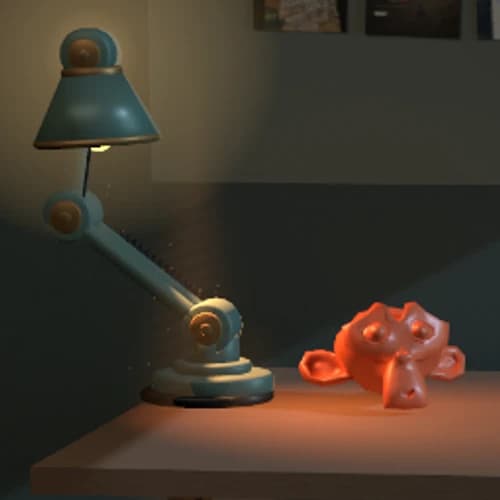
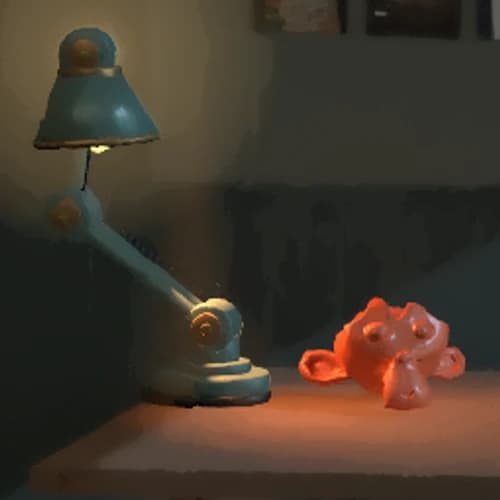
The monitor needs a different treatment from the desk. A mask reduces the filter over its text. In the live scene, depth information also helps reject smoothing samples from another surface. The still-image study has no depth buffer, so it cannot make that distinction.
Finding a useful strength
Thin objects reveal the cost of displacement quickly. Increase Edge displacement while watching the lamp's upright support and the gap beside it. Eventually the support loses its shape or the gap closes. Reduce the strength until you can follow the support again.
Then increase Smoothing radius. The lampshade should retain enough light-to-dark change to describe its curve. If it becomes an undifferentiated patch, the filter has removed more information than the image can spare.
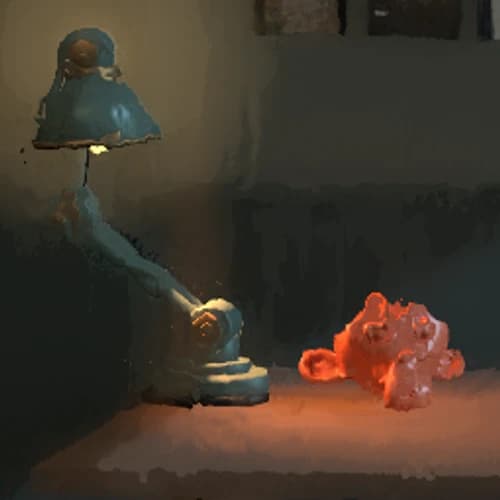
Repeat the comparison in a narrow window. The same offset occupies more of a smaller image, so a setting that works on a large desktop view may be too strong on a phone.
What happens during movement
The brush pattern stays fixed to the screen. That avoids a new random pattern every frame, but an object moving through it receives different offsets along its outline. The edge can appear to crawl.
Attaching marks to surfaces introduces a different problem: the marks change size and angle as the surface moves. Keeping a drawn or painted treatment consistent through motion is a subject of its own. 3
The still study is useful for finding a starting point. In the live workbench, also watch slow camera movement and check the monitor text. A good result needs to survive those changes as well as a single frame.
Cited works
- Three.js. Color management. Color textures and data textures.
- Jan Eric Kyprianidis, Henry Kang, and Jürgen Döllner. Image and video abstraction by anisotropic Kuwahara filtering, 2009.
- Pierre Bénard and colleagues. Coherent stylization research, 2010.
Maxime Heckel's On crafting painterly shaders informed the interactive comparisons. This filter also grew from experiments with brush displacement in the workbench's Blender compositor.